Skip to content


The safest way to pack a TV for moving is to protect the screen with cardboard or bubble wrap, fit foam corner protectors on all four corners, place the set in a purpose-built TV moving box or a snug custom box, and keep it upright the entire time. That single approach prevents the vast majority of screen cracks and edge damage.
Here is your immediate action checklist:
- Disconnect all cables and photograph the back panel before unplugging anything
- Remove the stand or wall-mount bracket and bag all screws in a labelled zip-lock bag
- Cover the screen with a cardboard sheet or two layers of large-bubble wrap
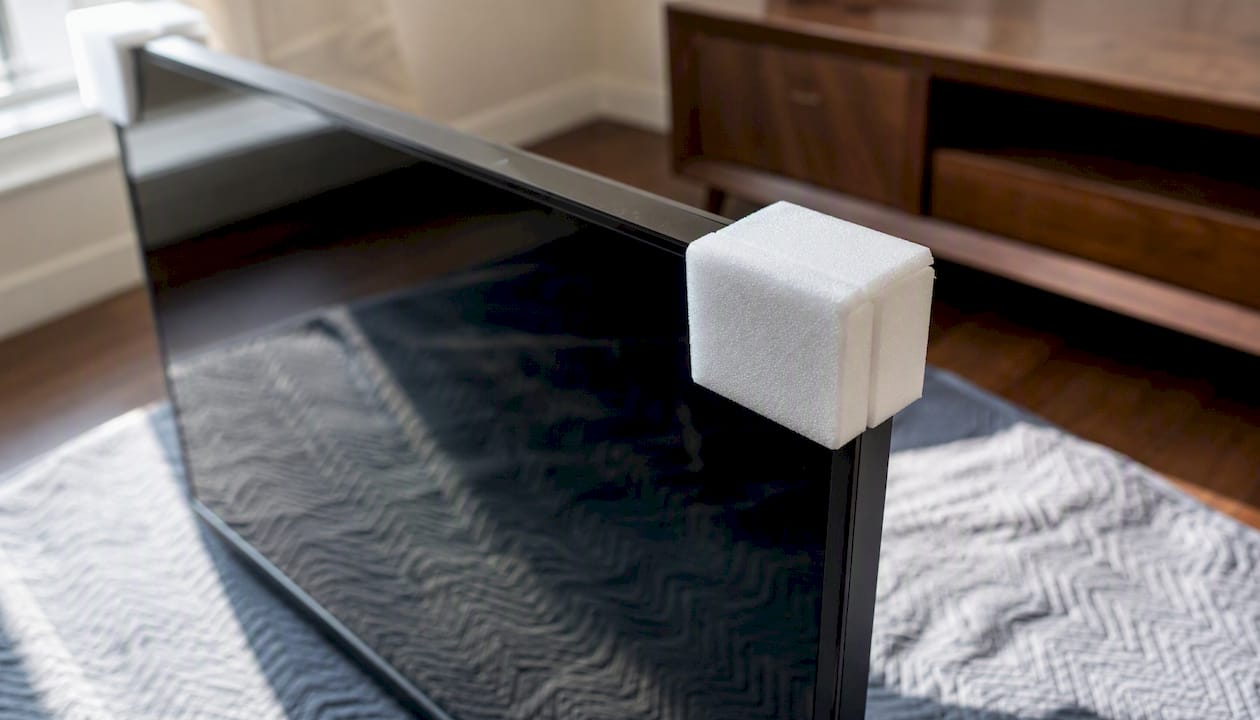
- Fit foam corner protectors on every corner
- Place the TV upright in a dedicated TV moving box or a snug blanket-wrap
- Mark the box “FRAGILE” and “THIS SIDE UP” on at least two sides
- Keep the set upright and secured in the vehicle at all times
When to hire a professional instead: If your TV is 65″ or larger, wall-mounted, or you are making a long-distance move without a proper box or a second person to help, calling a professional mover is the right call. The risk of a $1,500+ screen is rarely worth saving on packing labour.
Pro Tip: Take a photo of your cable layout before you unplug a single wire. You will thank yourself during setup at the new place.
Key takeaways
Packing a TV safely for a move requires screen protection, foam corner protectors, an upright-only orientation, and a purpose-built or snug custom box for any move beyond a very short local trip.
| Point | Details |
|---|---|
| Always keep the TV upright | Laying a flat-screen flat concentrates pressure on the glass and risks cracking the panel. |
| Use foam corner protectors | Corner impacts are the most common cause of TV damage; protectors are low-cost and high-value. |
| Match the box to your screen | Dedicated TV kits cover ranges like 32″–70″; confirm depth and weight before buying. |
| Blanket-wrap has limits | Blanket-wrap suits very short local moves only; long-distance moves need a rigid outer box. |
| Aleksmoving handles it for you | Flat-rate, insured TV packing and transport across Ontario with experienced two-person crews. |
Table of Contents
- What supplies do you need to pack a TV for moving?
- How to prepare and dismount your TV before packing
- How to pack a TV using the original or a dedicated moving box
- How to pack a TV without the original box
- How to secure your TV in the vehicle during transport
- Special considerations for very large TVs (65″ and up)
- When should you hire professional movers for your TV?
- Common packing mistakes and insurance tips
- How Aleksmoving packs and transports TVs
- Aleksmoving takes the risk out of moving your TV
- Sources
What supplies do you need to pack a TV for moving?
Gathering the right materials before you start saves time and protects your investment. Here is what you need:
- Dedicated TV moving box or expandable TV kit (sized to your screen)
- Foam corner protectors (four pieces, one per corner)
- Large-bubble bubble wrap (at least two full layers around the screen)
- Moving blankets (one or two for extra cushioning)
- Cardboard sheet cut to screen size as a rigid screen shield
- Packing tape (heavy-duty, at least 2″ wide)
- Stretch wrap to hold the blanket in place without touching the screen directly
- Zip-lock bags for screws, bolts, and remote batteries
- Permanent marker for labelling
Avoid single-wall, lightweight boxes. They flex under load and offer almost no edge protection. A double-walled box or a purpose-built kit is the standard for electronics.
Choosing the right box size
Dedicated TV moving kits take the guesswork out of sizing. The U-Haul expandable TV moving kit, for example, covers screens from 32″ to 70″, fits panels 1″ to 4″ deep, holds up to 120 lbs., and includes foam corner pieces and built-in handles. An X-Large variant accommodates screens up to 86″. Match the kit to your screen’s diagonal measurement and confirm the depth before you buy.
In Canada, these kits are available at U-Haul locations, Home Depot, and Canadian Tire, as well as online through their respective websites. Check product listings for exact depth and weight limits before ordering, since a slim OLED and a thick older plasma have very different depth profiles.
Pro Tip: Foam corner protectors are inexpensive and prevent the most common type of TV damage. Corner impacts during handling account for a disproportionate share of screen cracks, so this is one item worth buying even if you skip everything else.
How to prepare and dismount your TV before packing
Rushing the prep stage is where most people make their first mistake. Work through these steps in order.
- Power down and unplug. Turn the TV off, unplug the power cord, and let it sit for at least 15 minutes so any residual charge dissipates.
- Photograph the back panel. Before touching a single cable, take a clear photo of every port and connection. This makes reassembly straightforward and eliminates guesswork.
- Label and remove cables. Use masking tape labels or cable tags on each wire, then unplug them. Coil cables loosely and secure with velcro ties, not tight elastic bands.
- Bag all hardware. Place remote control batteries, wall-mount screws, stand bolts, and any other small parts into separate labelled zip-lock bags. Tape the bags to the back of the TV or pack them in the same box.
- Remove the stand or wall-mount bracket. Most stands unclip or unscrew from the base of the panel. For wall-mounted sets, you will need a second person and the original mounting hardware. Set the bracket aside and wrap it separately.
- Rest the TV safely. If you need to lay the TV down briefly during dismounting, place it screen-side up on a soft, padded surface such as a folded moving blanket. Never rest it screen-down on a hard floor.
Two-person rule: Any TV larger than 40″ should be handled by two people from this point forward. The panel is fragile at the edges, and a single-person grip on a large set puts uneven pressure on the frame.
How to pack a TV using the original or a dedicated moving box
The original manufacturer’s box is the gold standard. Factory inserts are engineered for the TV’s exact weight distribution and often include dedicated compartments for accessories. If you still have it, use it. If not, a dedicated TV moving kit is the next best option.
- Prepare the screen. Cut a piece of cardboard to the exact size of the screen and tape it lightly at the edges (never tape directly to the screen surface). Follow with two layers of large-bubble wrap.
- Fit foam corner protectors. Slide a protector onto each of the four corners. Press firmly so they sit flush against the frame.
- Open and size the box. If using an expandable kit, adjust it to the TV’s dimensions before inserting the set. The box should be snug, not loose.
- Slide the TV in upright. With a second person holding the opposite side, lower the TV vertically into the box. The screen should face the wider flat wall of the box.
- Fill any voids. Use crumpled packing paper or additional bubble wrap to fill gaps at the top and sides. The TV should not shift when you gently shake the closed box.
- Seal and label. Tape all seams with heavy-duty packing tape. Write “FRAGILE,” “THIS SIDE UP,” and “SCREEN INSIDE” on at least two sides with a permanent marker.
Before you move the box, do a gentle shake test. If you feel or hear movement inside, open it and add more void fill. A TV that shifts inside its box during transit is at real risk of corner damage.
How to pack a TV without the original box
Losing the original packaging is common. Two methods work well depending on your move type, and both are reliable when applied correctly.
Method 1: Professional blanket-wrap wraps the TV in two or three moving blankets secured with stretch wrap. It is quick and works acceptably for very short local moves where the TV travels a short distance in a controlled environment.
Method 2: DIY custom box involves cutting and taping double-walled cardboard into a snug box sized to the TV, then adding foam corner protectors and a rigid cardboard screen shield inside. This method offers significantly better protection and is the right choice for any move longer than a few city blocks.
| Feature | Blanket-wrap | DIY custom box |
|---|---|---|
| Protection level | Moderate | High |
| Cost | Low (blankets only) | Low to moderate (cardboard + foam) |
| Time to prepare | at least 15 minutes | 30–45 minutes |
| Best for | Very short local moves | Long-distance or multi-stop moves |
| Screen shield included | No | Yes (cardboard insert) |
When blanket-wrap is not appropriate: Skip it for long-distance moves, any move where cargo will be stacked, and high-value OLED or QLED screens. The blanket provides no rigid protection against a box edge or a shifting load pressing against the panel. For packing fragile items on a long-distance move, a rigid outer shell is the professional standard.
How to secure your TV in the vehicle during transport
Packing the TV well only matters if it stays stable during the drive. How you load it is just as important as how you wrap it.
- Keep it upright at all times. Laying a flat-screen TV on its side concentrates pressure on the glass and internal components, which can cause cracking or edge distortion even without a visible impact.
- In a car or SUV: Stand the TV upright in the back seat or cargo area, leaning against the seat back. Wedge it between two soft items such as pillows or folded blankets to prevent side-to-side movement.
- In a moving truck: Position the TV upright against a flat wall or between two large, stable items like a mattress and a sofa. Use ratchet straps or rope to secure it to the truck’s wall anchor points.
- Never place heavy boxes on top of or directly beside the TV box. Even a moderate weight pressing against the panel during a sharp turn can crack the screen.
- Avoid the cab area or the very back of a truck where temperature swings are most extreme.
Acclimatisation before powering on: If the TV has been in a cold vehicle or storage unit, let it sit at room temperature for at least two hours before turning it on. Condensation can form on internal components in cold-to-warm transitions, and powering on too soon risks short-circuit damage.
Pro Tip: Slide the TV box between the mattress and the sofa in the truck. Those two items act as natural shock absorbers and keep the set perfectly upright without straps.
Special considerations for very large TVs (65″ and up)
A 65″ or larger TV introduces challenges that go beyond packing materials. Measure before you move.
- Screen diagonal vs. box dimensions: A 65″ screen typically measures roughly 57″ wide and 33″ tall. Add the box and you are looking at a package that may not clear standard doorways (32″–36″ wide) when carried flat. Always carry it upright.
- Depth with stand removed: Most modern flat panels are under 3″ deep, but older models can exceed 4″. Confirm depth before ordering a moving kit.
- Vehicle clearance: Measure your vehicle’s interior height and width before moving day. A 65″ TV box standing upright needs roughly 36″–38″ of interior height in a cargo van or truck.
- Weight: Large-format sets can weigh 30–50 kg. Two people are the minimum; three is safer on stairs.
- Stairwells and elevators: Measure doorway widths and stairwell landings in advance. A TV that fits through the front door may not navigate a tight stairwell turn.
- Long-distance moves: For cross-province transport, consider a rigid wooden crate or a professional crating service. The additional cost is modest compared to replacing a large-format display.
For professional handling of oversized or specialty items, a trained crew with the right equipment removes all of these risks from your plate.
When should you hire professional movers for your TV?
Some moves genuinely call for professional help. Work through this checklist honestly.
- TV value: If the replacement cost exceeds $1,000, the cost of professional packing is almost always justified.
- Screen size: 65″ and larger sets are difficult to handle safely without trained crew and proper equipment.
- Wall-mounted installation: Dismounting a wall-mounted TV without the right tools or a second person risks both the TV and the wall.
- Distance: Long-distance moves across Ontario or between provinces require rigid outer protection and secured loading that DIY methods rarely achieve consistently.
- No original box and no second person: This combination is the most common scenario for accidental damage.
- Insurance concerns: Some home insurance policies do not cover owner-packed items. A professional packing service typically includes coverage for items packed by the crew.
A professional moving service for a TV should include a pre-move assessment, foam corner protection, a dedicated TV moving kit or custom crating, two-person lift and load, upright secured transport, and unloading at the destination. Local same-city TV delivery typically ranges from roughly $45 to $180 depending on screen size, distance, and speed. Without original packaging, couriers may add modest additional packaging fees.
Aleksmoving offers packing and moving services across Ontario with experienced two-person crews, flat-rate pricing, and insured transport for electronics including large flat-screen TVs.
Common packing mistakes and insurance tips
Most TV damage during moves is preventable. These are the errors that cause it most often.
- Laying the TV flat in the vehicle. This is the single most common cause of screen damage and is never acceptable for flat-panel displays.
- Skipping corner protectors. Corners are the most vulnerable point on any flat-panel TV. Foam protectors cost very little and prevent the most frequent type of impact damage.
- Taping directly to the screen. Adhesive residue can permanently damage screen coatings. Always use a cardboard shield between the tape and the panel.
- Stacking boxes on top of the TV. Even a light box pressing down during a bumpy drive can crack a screen.
- Ignoring labels. “THIS SIDE UP” and “FRAGILE” labels only work if everyone handling the box reads them. Write them large, on multiple sides.
- Powering on immediately after transit. Wait at least two hours after a cold-weather move before turning the TV on.
Insurance note: Check your home insurance policy and your moving company’s coverage before moving day. Some policies exclude owner-packed items from damage claims. If you pack the TV yourself, document the condition with photos before and after the move. For packing fragile items safely, professional packing services typically include coverage that DIY packing does not.
How Aleksmoving packs and transports TVs
Aleksmoving has been handling residential and commercial relocations across Ontario for over 18 years. For flat-screen TVs and other sensitive electronics, the workflow follows a consistent process: pre-move assessment of the TV’s size and mounting situation, selection of the appropriate packing kit or custom crating, foam corner protection on all four corners, screen shielding, upright loading against a secured wall in the truck, and careful unloading at the destination.
Every move is priced at a flat rate with no hidden fees, and transport is insured. Crews are trained in two-person lift techniques for large-format displays and carry the packing materials needed for electronics on every job. For packing electronics during a move, having a trained crew handle the process removes the most common points of failure entirely.
One tip that makes a real difference
The step most people skip is the gentle shake test after sealing the box. Before you tape it shut for good, close the flaps and give the box a slow, deliberate shake in each direction. If you feel the TV shift even slightly, open it and add more void fill until the set is completely immobile inside the box. A TV that cannot move inside its packaging is a TV that will arrive undamaged. It takes 30 seconds and it is the single most reliable indicator that your packing is actually done correctly.
Aleksmoving takes the risk out of moving your TV
Packing a large flat-screen TV correctly takes the right materials, a second set of hands, and careful loading. When any one of those elements is missing, the risk of damage goes up sharply.

Aleksmoving handles the entire process for you: we bring the packing kits, corner protectors, and moving blankets, and our experienced two-person crews handle the lift, load, and secure transport. Whether you are moving locally within Ontario or making a longer relocation, our flat-rate pricing means you know the cost upfront with no surprises.
- Local and long-distance residential moves across Ontario
- Full packing service including electronics and large flat-screen TVs
- Insured transport with flat-rate, no-hidden-fee pricing
Request a free quote and let us handle your TV safely from door to door.
Sources
TV moving kits and packing supplies are available at Home Depot, Canadian Tire, and U-Haul locations across Canada, as well as through their online stores. Always confirm that the kit’s listed depth range matches your TV model before purchasing.